Dynamic Wideboard
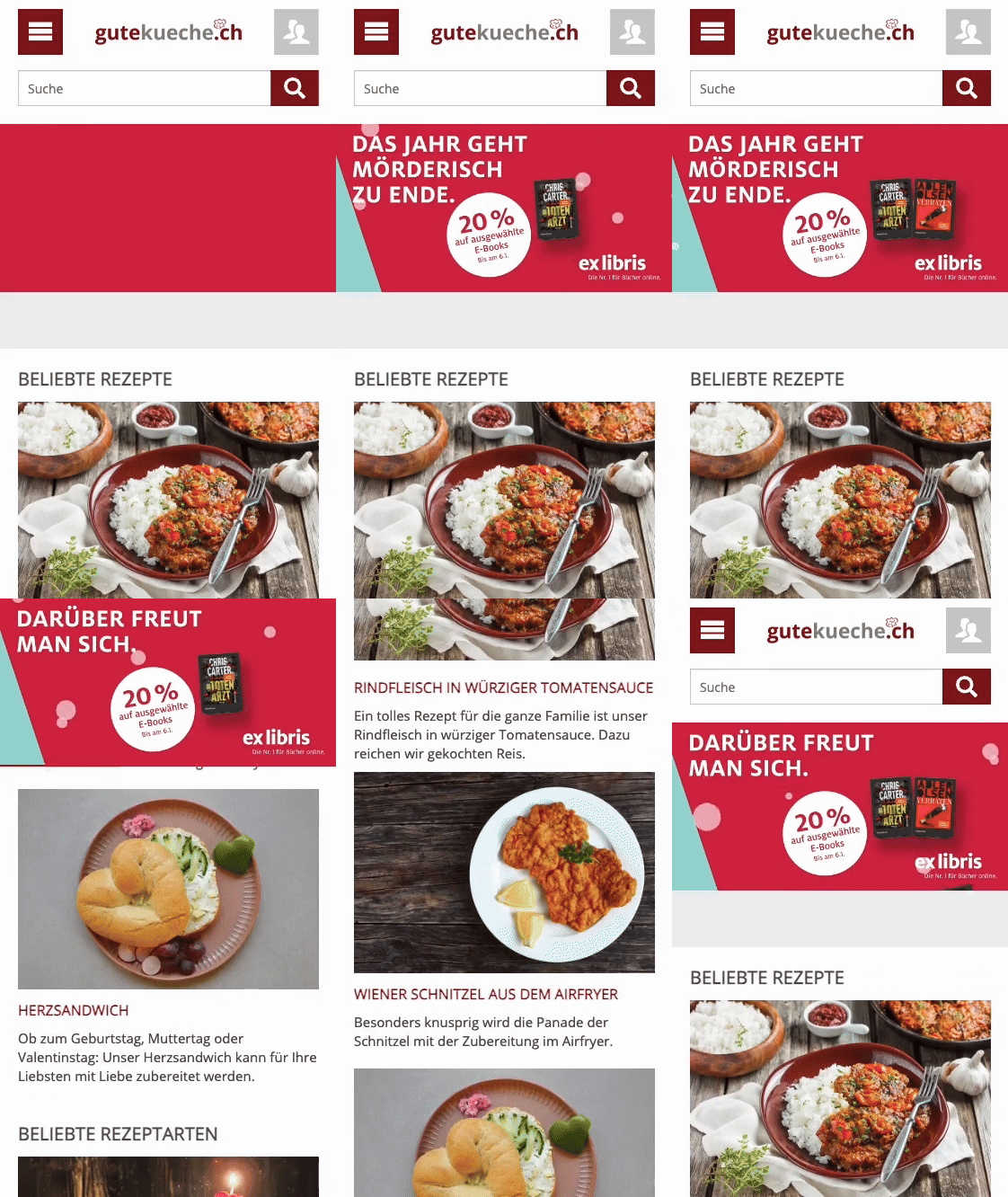
The Dynamic Wideboard is the dynamic evolution of the classic Wideboard and ensures maximum attention in the header, both on desktops and on mobile devices. It consists of a start element and a Sticky element, each of which can be implemented as an image or animation. When scrolling, the start element is pushed upwards, while the Sticky element remains “sticky” in the visible area for a short time, thus ensuring additional visibility.
Watch the Dynamic Wideboard in action

General
Placement: in the upper area of the website (header)
Structure: two elements (start element and Sticky element)
Scrolling behavior
The start element is pushed upwards when scrolling.
The Sticky element remains in the visible area for approx. three seconds (unless the user interacts).
Desktop
1. Start Element
Variation Image
File format: PNG, JPG, Photoshop, InDesign, Illustrator
File size: 994×250 px
File weight: max. 1 MB
Variation Animation
File format: HTML 5*
File size: 994×250 px
File weight: max. 1 MB
Delivery times
Standard formats: 3 working days before the start of the campaign.
Special formats: 5 working days before the start of the campaign.
Data delivery Online advertising material
Number of subjects
Max. 3 subjects (incl. tracking) for physical delivery. (Native Ads: A maximum of 5 text-image combinations are possible per language region and campaign).
For more than 3 subjects, delivery must be made via 3rd party tag and the exchange of advertising material must be carried out on the customer’s side.
The exchange of physical subjects during an ongoing campaign is only permitted in exceptional cases.
Animations
The length of the animation within an advertising banner is not limited. However, the recommended maximum duration is 30 seconds.
For more than 3 subjects, delivery must be made via 3rd party tag and the exchange of advertising material must be carried out on the customer’s side.
The exchange of physical subjects during an ongoing campaign is only permitted in exceptional cases.
Sound
Activation only through user interaction.
Flash
Activation only through user interaction.
SSL
All third-party tags, tag-in-tags and references in an HTML5 file must be delivered via SSL (https://).
HTML5
- The maximum weight (according to specifications) refers to all files together in unzipped state.
- The target URL and tracking must be stored in the HTML5 banner.
- The target URL must be opened in a new tab (target=’_blank’).
- Advertising material tests must be possible locally in the browser.
- UTF-8 encoding
- Special characters that are not displayed correctly in the browser with UTF-8 must be manually encoded (example [&]auml; instead of ä).
- References in the advertising material to external resources (JS libraries, videos, fonts) must all be delivered via SSL (https://).
Skip Button
To activate the “Skip button” for Instream videos that use a VAST redirect, the “Skip Off-Set” parameter must be added by the customer in the VAST redirect.
General information
- A timely campaign start is only guaranteed if the delivery deadlines are met.
- The advertiser is responsible for the smooth functioning of the advertising material.
- A campaign may be withheld if it does not meet the specifications.
- Max. 1 count pixel and 1 click command (PreRoll [&] Bumper, Desktop [&] Mobile)
- Advertising from the erotic sector requires prior clarification and may be rejected by the publisher.
- Advertising materials are tested on the most common devices, screen resolutions and browsers. Certain individual settings or configurations can lead to deviations in the display of the advertising materials.